
2.0 List of customers who placed their first order
The Archive > New Customers tab allows you to view a list of all customers who placed their first order on a current day. This allows you to track the number of new users and contact them if necessary.
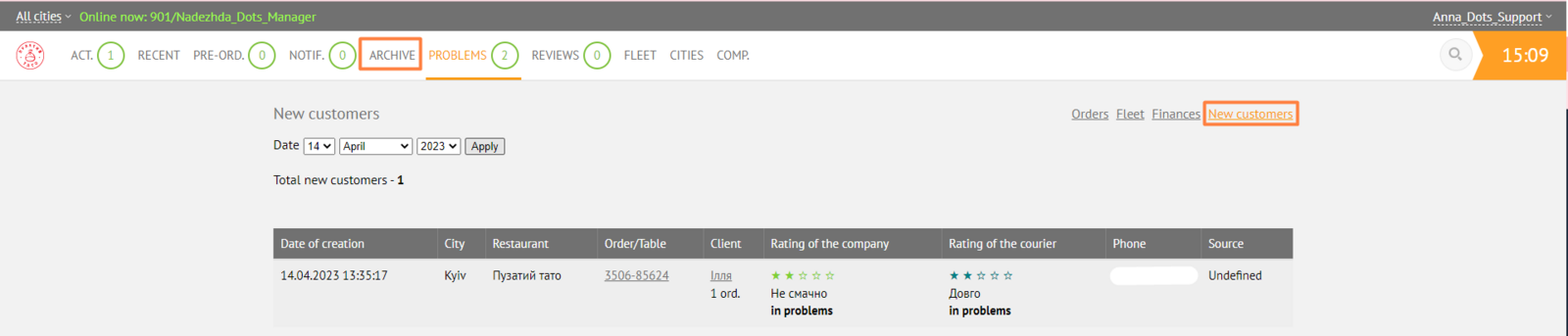
Displayed elements
To display a list of clients, you must select a date in the upper left part of the page and click "Apply".

Below is a table that contains the following elements:

-
Creation date. The date and time when the order was placed.
-
City. The city in which the order was placed.
-
Restaurant. Company name.
-
Order/table. The number of the customer's order, or the number of the table at which the customer was sitting. When you click on the number, a card of the corresponding order will be opened in a separate tab.
-
Client. Customer's name and the number of their successful orders. The customer's order history will be opened in a separate tab when you click on the name.
-
Company's rating. Pick-up point's rating and related comment. The comment is only required for ratings less than 5 stars.
-
Courier's rating. The courier's rating and related comment. The comment is only required for ratings less than 5 stars.
-
Telephone. The customer's phone number, when clicked, automatic dialing will start.
-
Source. The source from which the customer learned about your service.
Link to this article: here
Was this article helpful?
Thanks for your feedback!