
How to send a conversation record?
There are two ways to send a recording of a conversation:
-
To transfer a conversation via a link, go to your Personal Account → the desired conversation → the loudspeaker icon, and in the window that opens, click on the Copy link button.
-
To transfer a conversation recording as a file, go to your Personal Account → the desired conversation → the loudspeaker icon, and in the window that opens, click the Save file button.
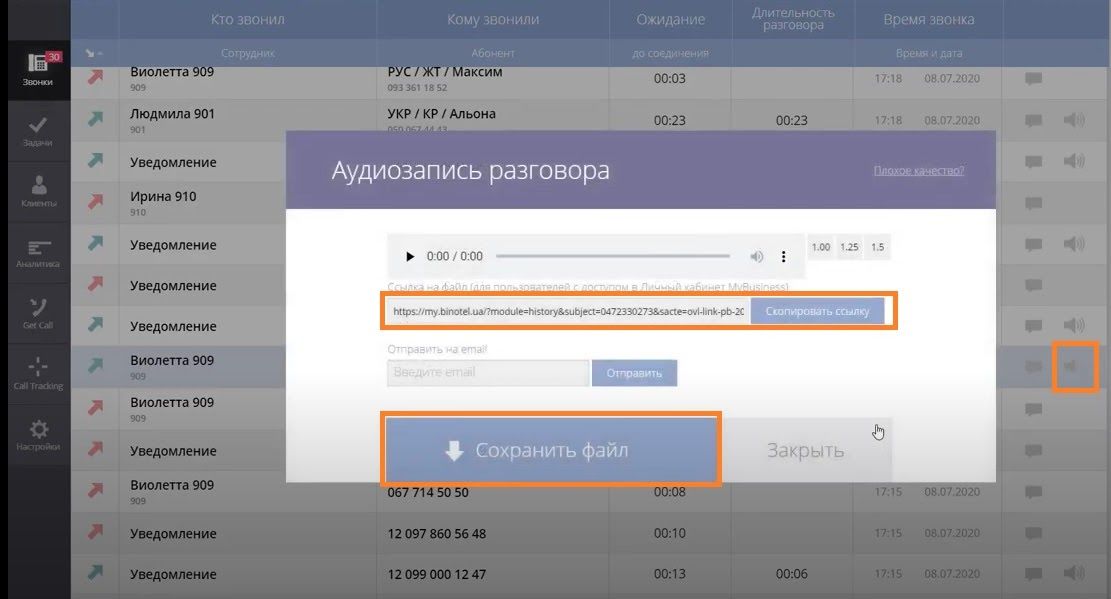
Recording via the link will be available only to authorized operators/users who have the appropriate access.
Link to this article: here
Was this article helpful?
Thanks for your feedback!