
2.0 Control panel. Settings. Interfaces. Rules
Add a link to the user agreement that contains conditions and rules for the use of website materials and personal data.
To add a link:
- In the Control Panel, click Settings.
- Go to ** Interfaces ⇾ Rules**.
- In the Link to the user agreement field, add a link to the user agreement document.
- Click Save.
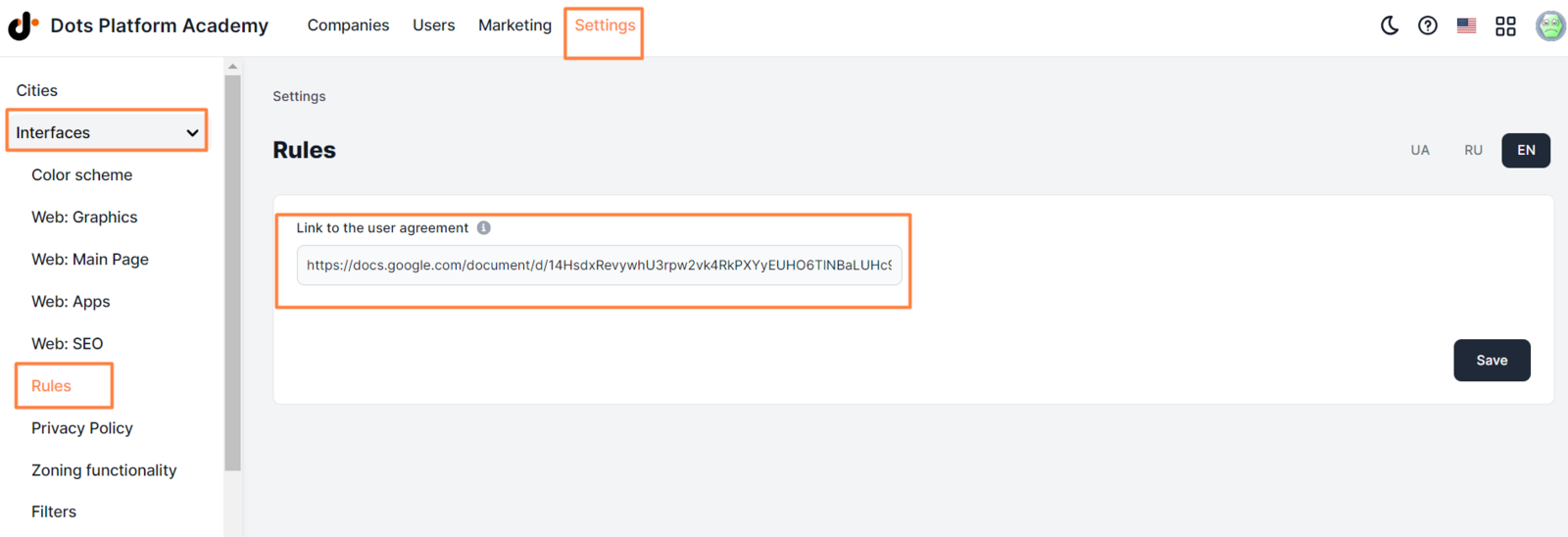
Link must include “https://”. ** Correct format ** _ https://docs.google.com/document/d/123A7Nn3mzd3A5h8OU8Xhy4o09w-W_6CkfGl3Vjdc630/edit _
** Incorrect format ** docs.google.com/document/d/123A7Nn3mzd3A5h8OU8Xhy4o09w-W_6CkfGl3Vjdc630/edit
The link appears in the footer of all pages of the website.


It also appears in the app at the Profile > Information about the app section.

Link to this article: here
Was this article helpful?
Thanks for your feedback!